
Nov 13, 2024
Nov 13, 2024
Release 2024.11.1 - QM
Added Advanced statistics module
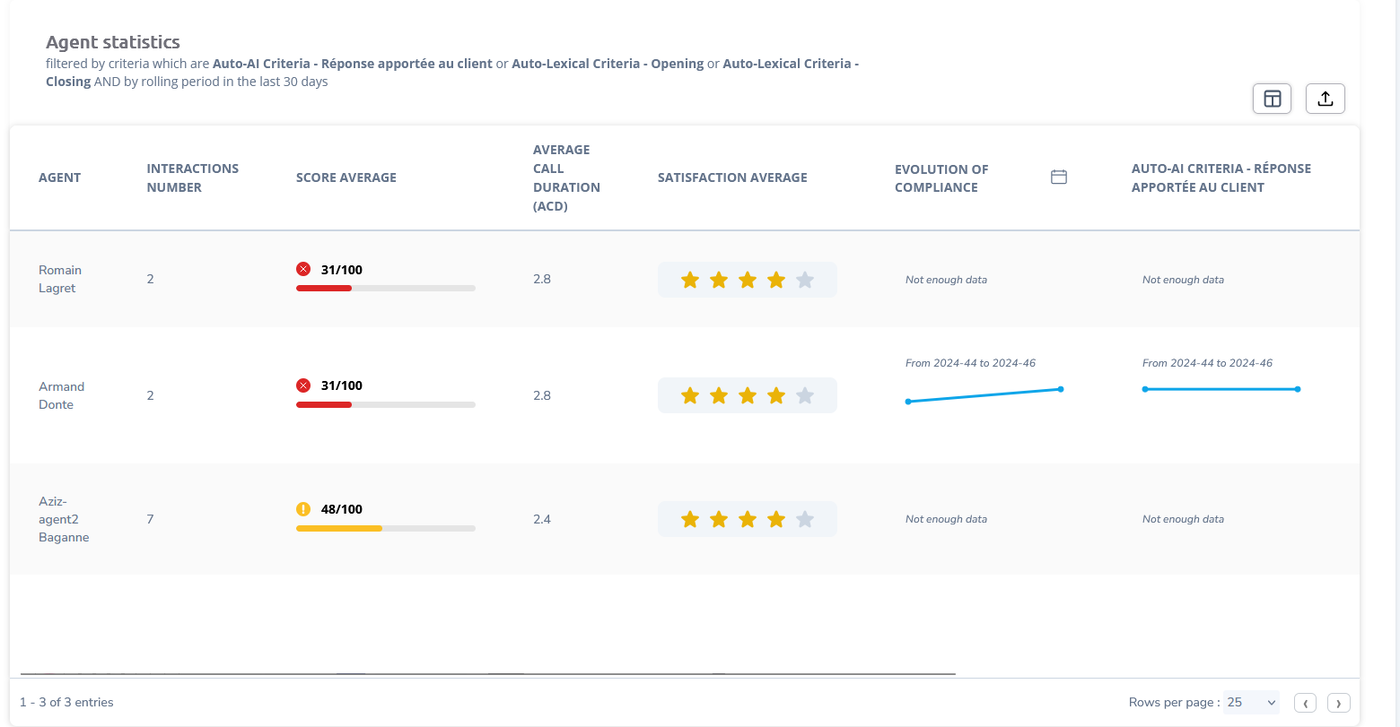
- You can now setup tables as a report on any dashboard. These reports will show metrics such as number of calls taken, average score and average call duration, and more. You can setup tables for Agents, Criteria, Brands, Deployments, User Groups & more. The columns are selectable and you can export all tables in PDF, Excel or CSV.
- You can now setup a report containing a summary of the conformity statistics for criteria. It will display the frequency of all chosen options, as well as their conformity in colors, and the evolution of compliance over time.
- On Agent & Criteria tables, you can filter by Criteria. On Agent Tables, filtering by Criteria will make the table display the conformity of all agents on that specific criteria as new columns.
- This means that you can now have the conformity evolution of all agents on all criteria provided you configure things properly.
- There is now a rolling period date picker. Previously you were only able to set up a fixed day. Now the dashboards update themselves every day if you choose a rolling date.
Added in-app notifications action
- There is a new action in Actions that is capable of sending different types of in-app notifications. You can configure the level of the notification, (Info, Error, Warning), and it will be displayed in the notification alongside with the Interaction that triggered it, and a customized message if needed.
- You can configure the recipients for such notifications from the admins & supervisors.
Added tag action
- There is a new action in Actions that is capable of adding a tag automatically to the interaction.
- Various use cases can be "if the call has a score of less than 10, affect tag "bad call"", "if the call lasts less than 50 seconds affect tag "short call""
Added possibility to add multiple calls from the interface
- There is now a function on the interaction list page to allow users to upload calls to the platform.
- Filling in the correct information has to be done for all calls manually, but you can bulk send many calls in one single click.